No. Not every photo displays a halo effect.
The halo effect does not have to appear in every photo in order for your method not to be valid for its claimed purpose. What matters is that for the images in which it does appear following your errant manipulation of the luminance channel, we know
why it appears and we can trace it conclusively and exclusively to the effect of your adjustment.
The effect appears in any image with poor resolution after oversampling—or as some have alternatively (and correctly) termed it, upscaling. This creates feature edges composed principally of midtones: pixels whose brightness lies in the middle of the image gamut (it's mathematical ability to represent brightness). Or put simply, the edges of the features in your low-resolution photos contain lots of grays.
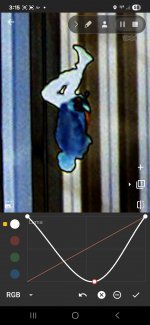
Your images are RGB sampled. There is no luminance channel per se, but a pseudo channel can be manipulated by scaling each of the RGB channels through a weighting factor. For general radiometry, an energy (wavelength) weighting function is used. This accounts for shorter wavelengths (blue, in this encoding) having higher energies. For photography, a perceptual weighting vector is used. This accounts for the human eye's propensity to reckon brightness from the wavelengths closer to the center of the visible spectrum (i.e., green). I have applied your preferred tool Photo Curves to test images and I have determined that it is using perceptual weights to apply a "Luma" manipulation to the wavelength-specific channels.
Your adjustment curve does not magically reveal any prior retouching or image tampering. That is simply fantasy. It does not reveal anything about any prior alpha channel in the image. It does not reveal anything having to do with any layers that a prior image composition tool might have used to represent the image during editing. A layer as used in these programs is not a component of the image. It is a separate image with some metadata to describe how to combine it with adjacent layers. As I explain below, your adjustment is lossy. Rather than reveal distinctions in image data, it obscures them.
Your adjustment curve places a peak inexplicably in the center of the luminosity gamut and attenuates high luminosity (bright) and low luminosity (dark) portions of the image. Broadly speaking, this produces a false-color image, which you seem to understand. Without understanding what has been done to the image, an observer will correctly note that the lighting expressed in the image is "unnatural."
The effect of the peak will be similar to a poorly regulated band-pass filter. A band-pass filter preferentially amplifies a relatively narrow band of the signal. The "signal" in this case is the image luminosity, or brightness. The "band" being amplified are those pixels whose brightness corresponds to the x-axis of your curve at which the peak occurs: in this case, midtone grays. This corresponds to the fuzzy edges on features such as the airliner. In the false-color representation that results, the passed band is white (or very bright). This is akin to how edge detection works in image processing. Your adjustment does nothing more exotic than detect edges in favorable cases and falsely render them white.
Because your adjustment function is not monotonic, it is lossy. It will produce the same output for some number of different inputs. Specifically, near the peak value, midtone grays of different brightness in the input will be rendered as the same brightness in the output according to symmetry. On a normalized [0...1] luminosity scale and a gamut with the adjustment function peak at
m, for some differential luminosity offset
b, inputs with luminosity
m+
b and
m-
b will map to the same output value. Visually, this has the effect of creating a bright band composed of misleadingly adjusted values. It falsely conveys the impression that a bright band exists in the source image that is composed of a single brightness value.
This is the process by which your luminance channel maladjustment produces the illusion of anomaly.
Yes. All poorly constructed composite photos with inferior programs display artifacts edges that are unnatural.
No, you have neither shown nor explained how you think the artifacts you see in the images you manipulate are the result of "poorly constructed composite photos." Nor do you seem to have a correct understanding of the basic principles of digital image storage and representation. You keep alluding to things such as layers and alpha channels that are not present in the images, and you refuse to explain how your method purportedly exposes the role of those elements in any prior workflow.
The appearance of your images is indeed unnatural—because you have made them so.
The conclusion is mathematically certain. Your disagreement is irrelevant. Spamming the thread with more examples of your error is not probative or helpful.