Digital photography analyzing

Thanks for this link, ChristineR!

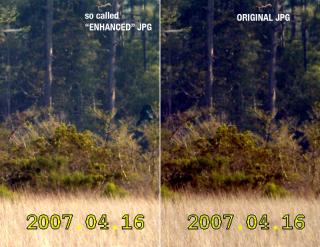
I took the "original" JPG, and the one labeled "enhanced", the one sent to the guy who posted that thread over there (if I understood correctly).

This will take several steps/posts. I do not know where this is going, let's see. I'll post step by step.

STEP 1

I resized and cropped the original JPG to match the lower resolution enhanced JPG. No further modifications:


(Click for full size)
 
Last edited:
STEP 2

I adjusted the brightness and contrast of the original JPG, also the color balance (more green and yellow).

My goal was to make the original match the "enhanced" JPG regarding brightness, color tone etc.

Not perfect, but pretty close I think:


I'm already having a very bad feeling about the picture on the left, the "enhanced" one. Open the full size version of my above STEP 2 picture, and cover the middle of the picture with your hand. The top and bottom part look like exactly (well, almost exactly) the same picture. Compare the bushes in the middle - they seem almost 100% identical in appearance. Only that dark thingy there on the very right seems to stand out. Not sure about this yet, let's see.
 
Last edited:
I believe it was claimed that the enhanced version has the blue channel turned up. I not sure why this would be done, as the dark spot of interest is not particularly blue. However, the colors do appear to be less saturated in the enhanced version.

For ThunderFoot and others: saturation is like the color knob on your TV. Turn it all the way down and you've got black and white TV. What may be happening here is that the color knob is turned down but the blue knob is turned up only in one area. This is not an outrageous thing to do, but if you draw an outline of a particular shape and color it over with blue (as if you put a clear blue paper doll cutout over the image) you are added info to the image.

An example which I hope might help: You might do something like this to make a little girl's dress more vividly blue. But if you arbitrarily recolor a dress-shaped portion of the image and tell people there is a ghostly blue dress in the image, you have added info.
 
I believe it was claimed that the enhanced version has the blue channel turned up.

That would have to be a rumour, since the enhanced JPG has more yellow than the original, quite the opposite of blue.

Anyway, I gave it a try and played around with the blue channel, adding a bit of blue etc. — no usable result, it completely destroys the image, makes it look unreal.

I'm trying various other things right now, will post shortly.
 
STEP 3

Since both pictures seem very similar to me already, despite that dark thing there on the right, I was not sure what to do next in terms of overall image adjustments to get the original one closer to the "enhanced" JPG.

Here's a brief protocol of what I did:

STEP 3 Try 1:
The dark thing in the enhanced picture seems quite clear, crisp. I tried various sharpening filters – not one of them made the original JPG look even remotely close to the enhanced one. Also, the enhanced picture does not show any signs of a sharpening filter used.
Result: sharpening? No.

STEP 3 Try 2:
Enhancing the shadows of the orginal picture. That's similar to what I did previously in this thread. While this makes the "eyes" a little bit visible, it destroys the rest of the picture:


While this makes the dark shape resemble more the one in the "enhanced" JPG, this can't be it.

STEP 3 Try 3:
I am getting desperate now! Trying various things to make the shape on the right resemble the one on the left, in the "enhanced" picture.

How could those "eyes" possibly show up? Even an extreme adjustment of brightness and contrast does not work:


My bad feeling about that "enhanced" picture get's even worse. I found another detail that bothers me, will show you in the next post.

 
STEP 4

Let's recap. Back in Step 2 we already had what I would say are very similar images, except for that dark thing on the right:


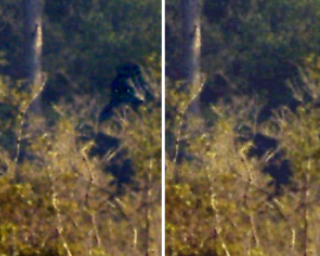
Since both images look quite similar to me in general appearance, I would not know how in the world the one on the left could clearly show that figure.

How?

As of now, for all I know about Photoshop, photographs and stuff, I have no other explanation that the "enhanced" picture has been deliberately modified by painting. In other words: I think someone added a few pixels here and there.

Look at this close-up of my current Photoshop file:


You can see that the bushes and trees look VERY similar in both pictures. Only that dark shape stands out in the "enhanced" picture. Look at the "eyes" - how in the world could that happen only by adjusting contrast, brightness etc.? The rest of the picture is almost perfectly identical. Why not the head?

Look left of the "eyes". In the original JPG, there is not enough green leaves to make such a distinct shape, not even if I turn up values here and there to the extreme.

My conclusion for now:

With the given material, I personally do not see any way to produce that "enhanced" picture without pixel modification. My best guess: Someone painted around in that picture.
 
well here is my 2 cents. I located where that part of the image was on a histogram and ramped up the R, G, & B channels up pretty severely to see what would be hidden , if anything at all.

from what I can tell the supposed bigfoot shape doesn't "pop" out of the background as much as it does in the enhanced pics, even with severe enhancements. My guess would be the shape of the bigfoot was artificially imposed somehow, either by drawing it in or masking it out.

bigfoot.jpg


I tried to show where the delineation of bigfoot's head and the trees behind it should be, but I don't see anything at all. I think its just an opening between some branches.
 
Last edited:
I fully agree, sesshin. The area you pointed out, left of the "head", was exactly what made me come to my conclusion above.
 
OK, against my better judgement...

A quick local equalize shows the shape, and simulacra vaguely resembling a head. It also shows a second simulacra in the background, which IMO is better than the other. However, a brief examination shows that these shapes are negative shapes created from branches and leaves.

It appears a later (and rather poor) enhancement was added to dot the eyes. A pity they didn't cross the t's too, but there you go.

simulacra.jpg
 
wahrheit - look at the tree branch RIGHT next to the eyes in the "enhanced" picture - to me, it look brighter than the corresponding tree branch in the original picture. By contrast, the tree branches across his stomach look to be the same brightness in both pictures. Even the branch right UNDER the eyes about the same brightness in both pics.

In other words, I think that area was selectively tampered with.

Edited to add: Baron, a few of us have pointed out that shape before, with much glee and chortling, since the tree is visible through the shadow.
 
Last edited:
Edited to add: Baron, a few of us have pointed out that shape before, with much glee and chortling, since the tree is visible through the shadow.

Sorry, didn't read the other thread :)

Yep, I'm sure if I were of a mind I could find a whole zoo in that wood, plus a few dead relatives too.
 
It appears a later (and rather poor) enhancement was added to dot the eyes.

Absolutely. I could not come up with any other possible explanation while playing around with Photoshop.

wahrheit - look at the tree branch RIGHT next to the eyes in the "enhanced" picture ...

Yep, what's supposed to look like the "cheekbone" must have been tampered with, I couldn't get that contrast by adjusting overall image properties. That is, without ruining the rest of the picture.
 
Nearly all digital cameras create color images by interpolation of Bayer filtered sensor values. For instance, an 8MP image is formed from 4MP of green pixels, 2MP of blue pixels, and 2MP of red pixels. Thus a great deal of image content is estimated. The specific algorithms used can vary but are specific to each camera. Since the vast majority of output image value combinations can not be created by a specific camera it should be possible to identify manipulated images by determining if any portions of the image contains "impossible" value combinations.

It should also be possible to identify the specific algorithm used in the Bayer interpolation by examining an image.

This wouldn't be able to identify all manipulated images but should be able to declare an image manipulated with certainty if it can identify even one impossible set of adjacent pixel values.
 
Nearly all digital cameras create color images by interpolation of Bayer filtered sensor values. For instance, an 8MP image is formed from 4MP of green pixels, 2MP of blue pixels, and 2MP of red pixels. Thus a great deal of image content is estimated. The specific algorithms used can vary but are specific to each camera. Since the vast majority of output image value combinations can not be created by a specific camera it should be possible to identify manipulated images by determining if any portions of the image contains "impossible" value combinations.

It should also be possible to identify the specific algorithm used in the Bayer interpolation by examining an image.

This wouldn't be able to identify all manipulated images but should be able to declare an image manipulated with certainty if it can identify even one impossible set of adjacent pixel values.

Yes, but for this to work we would need the "enhanced" picture in the original resolution of the camera, and not only the cropped and resized JPG we have so far.

Also, as far as I know, we do have the original JPG in full resolution. And this JPG does not show some creature on the right hand side. Even without Bayer and sensors - there's only one possible conclusion so far: Someone played around with that picture.
 
Last edited:

ISF - Join now!

Every member here is approved by hand. No bots, no spam, just people who care about evidence and honest debate.

Membership is free!

Create your free account

Back
Top Bottom