
I have a rather odd collection of software on my pc, and recently needed to get the Saber simulation package installed. After our normal support struggled to get it to work, one of our Linux guys in Germany managed to do it - although that involved him learning a bit more about windows than he liked. Our Linux support engineers are very good, and certainly take a very wide view of what should be in their remit.

You are using an out of date browser. It may not display this or other websites correctly.
You should upgrade or use an alternative browser.
You should upgrade or use an alternative browser.
Dear Users... (A thread for Sysadmin, Technical Support, and Help Desk people)
- Thread starter JoeMorgue
- Start date
- Status
- Not open for further replies.
catsmate
No longer the 1

- Joined
- Apr 9, 2007
- Messages
- 34,777
Why not just remap the buttons? KeyTweak or something like that.I have a "things are different and IT support can't really change it" issue with my work PC.
We have Lenovo laptops and separate Lenovo keyboards for our desks.
The laptop has the ctrl and fn buttons swapped compared to the standalone keyboard. WHY LENOVO DID YOU DO THAT? I could understand if they decided to go their own way, but no, it was just their laptop.
Do you know how many times I have pressed Fn+C and Fn+V and failed to paste things?
Why not just remap the buttons? KeyTweak or something like that.
I did consider that, but two reasons.
Firstly they's still *say* the wrong things, which would offend me
Secondly, I could request free software put on it, but I tend to avoid unnecessary utilities as every change makes it more complex, and I am often using a remote connection to a windows server, a different connection to a linux server, and my own windows software so life is complicated enough.
And most of the time I'm at my desk with a docking station
arthwollipot
Limerick Purist Pronouns: He/Him

Ugh, Linux people can be the WORST. Not all Linux people, obviously, but if you hear someone saying "I refuse to have anything that has been touched by Microsoft in my house", then I guarantee that person is a Linux person.
phiwum
Penultimate Amazing

- Joined
- Aug 25, 2010
- Messages
- 13,590
Nah, they could be freeBSD guys.Ugh, Linux people can be the WORST. Not all Linux people, obviously, but if you hear someone saying "I refuse to have anything that has been touched by Microsoft in my house", then I guarantee that person is a Linux person.
I am a linux user, by the way. One of my schools just switched email authentication in a way that is apparently not supported by my mail client. Using a web interface sucks, but what can you do?
theprestige
Penultimate Amazing

Switch mail clients? What's the point of being a Linux user if you can't swap out utility programs at will?Nah, they could be freeBSD guys.
I am a linux user, by the way. One of my schools just switched email authentication in a way that is apparently not supported by my mail client. Using a web interface sucks, but what can you do?
novaphile
Quester of Doglets

Ugh, Linux people can be the WORST. Not all Linux people, obviously, but if you hear someone saying "I refuse to have anything that has been touched by Microsoft in my house", then I guarantee that person is a Linux person.
That would be me.
The day I retire, will be the last day that I have to deal with Micro$haft crap.
I've probably lost more than a million hours of productive work because of their bone-headed ideas that break previously functional systems.
Wudang
BOFH

Wudang, have you used either of the first two programs listed in that link?
If so, do you have any comments about them?
No I haven't, sorry. In fact until reading this thread I'd have wondered why the hell someone would need them. Then again my desktops have almost nothing on them.

Ugh, Linux people can be the WORST. Not all Linux people, obviously, but if you hear someone saying "I refuse to have anything that has been touched by Microsoft in my house", then I guarantee that person is a Linux person.
I think Linux is a great idea in principle (mainly because UNIX is great), and most of my working life was spent working on commercial UNIX- and Linux-based systems. Where Linux falls down, apart from the fragmentation of distros, is the fact that the tech-heads who actually write it do not seem to be interested in the UI side. Windows has many, many flaws, but a novice user can, with a little hand-holding, start using the system, and that knowledge will transfer to pretty much any other PC running Windows. The same does not apply to Linux.
Wudang
BOFH
Also linux package management. Don't get me wrong, apt-get is great and Mint's software maintenance tool is good but most users will only want one tool.
No I haven't, sorry. In fact until reading this thread I'd have wondered why the hell someone would need them. Then again my desktops have almost nothing on them.
I don't know if it's died out, but there seemed to be a trend for fancy customised desktops a few years back, with all sorts of pretty backdrops and clever widgets for kicking off programs. They looked really nice, but I always wondered who spent any time looking at the backdrop. I have dozens of windows open, and the current one I'm using is usually full-screen; when would I ever see the backdrop? Most of the programs I'm going to use are already open, or are launched by clicking on the file I want to look at.
Getting a bit more back on topic, I was probably the nightmare customer of our IT department, because I certainly knew more about the system than at least the front line personnel, so if I was calling them it was because it was a problem that needed either expert knowledge or privileged access. I would also be typically running a number of programs (or apps, as they seem to be called these days) that were non-standard (mostly for fully-justifiable business reasons, a few for personal preference), and I was not doing a simple sales or admin job just using spreadsheets and email, so even if I did agree to giving them remote access to my desktop, it wouldn't help them.
Dabop
Master Poster

I always liked playing around with the backdrops, usually got a comedy one on it (not that they are usually in sight, I run twin monitors and would love a third lol)
One I always like putting up is this
https://i.postimg.cc/tJt6shym/mypornstash-desktop.png
which sits the 'folder' in a blank spot on my desktop, funny watching people trying to click it LOL
Also fun is to get their desktop icon to a commonly used program, do the same (put a image with the icon they normally click on in its usual spot) then rename the original icon and change its screen display, then move it to a different spot (right next to where it used to be is good or in a far corner) then watching them 'clicking it' repeatedly trying to open their program, then step in when they say it isnt working and discretely click on the new position while moving towards the 'icon' and obviously clicking on it
'works fine for me' as the program starts up, then close it back down and watch them clicking away at the 'icon' again..
Offer helpful hints like "Are you sure you are using the mouse right" and "Maybe click it faster?"
I have a very warped sense of humour...
One I always like putting up is this
https://i.postimg.cc/tJt6shym/mypornstash-desktop.png
which sits the 'folder' in a blank spot on my desktop, funny watching people trying to click it LOL
Also fun is to get their desktop icon to a commonly used program, do the same (put a image with the icon they normally click on in its usual spot) then rename the original icon and change its screen display, then move it to a different spot (right next to where it used to be is good or in a far corner) then watching them 'clicking it' repeatedly trying to open their program, then step in when they say it isnt working and discretely click on the new position while moving towards the 'icon' and obviously clicking on it
'works fine for me' as the program starts up, then close it back down and watch them clicking away at the 'icon' again..
Offer helpful hints like "Are you sure you are using the mouse right" and "Maybe click it faster?"
I have a very warped sense of humour...
Last edited:
novaphile
Quester of Doglets
Try popping the "n" and "m" keys off the keyboard, and then replacing them in each other's position.
This one is particularly hilarious if the person's password contains either of these two characters.
Please note, this doesn't work if the person is a touch typist.
My team had practically randomised the alpha keys on my keyboard, and I didn't even notice. Fortunately for me, they had swapped the F and J keys with each other, and they are the only keys I rely on. (Home keys for the index fingers).
If they had moved those keys one position to the left or right, I would probably have thought that I'd had a stroke and lost the ability to type.

This one is particularly hilarious if the person's password contains either of these two characters.
Please note, this doesn't work if the person is a touch typist.
My team had practically randomised the alpha keys on my keyboard, and I didn't even notice. Fortunately for me, they had swapped the F and J keys with each other, and they are the only keys I rely on. (Home keys for the index fingers).
If they had moved those keys one position to the left or right, I would probably have thought that I'd had a stroke and lost the ability to type.
Elvis666
Muse

No I haven't, sorry. In fact until reading this thread I'd have wondered why the hell someone would need them. Then again my desktops have almost nothing on them.
I have two monitors on my home computer, with large numbers of icons on each. Occasionally, Bill's OS of Horrors decides to reorder them randomly. I have a utility I've been using for years, Desktop Restore, that puts everything back with a couple of keystrokes.
Blue Mountain
Resident Skeptical Hobbit

On Unix-like systems, put a logout command into the user's .rc file 
I once had the situation where I was working on a computer in the machine room, and I could type the password successfully in one position (sitting, I think), and always failing in another (standing, next to the computer cabinet, and reaching for the keyboard). It turned out it was a non-standard keyboard, and in one position I was touch-typing, and in the other, because it was an awkward position, I was reading the key labels.Try popping the "n" and "m" keys off the keyboard, and then replacing them in each other's position.
This one is particularly hilarious if the person's password contains either of these two characters.
Please note, this doesn't work if the person is a touch typist.
My team had practically randomised the alpha keys on my keyboard, and I didn't even notice. Fortunately for me, they had swapped the F and J keys with each other, and they are the only keys I rely on. (Home keys for the index fingers).
If they had moved those keys one position to the left or right, I would probably have thought that I'd had a stroke and lost the ability to type.
novaphile
Quester of Doglets
I briefly worked with a guy who had a Dvorak keyboard.
He claimed that he could touch type with either, DSK or QWERTY, but it took his brain about two weeks to make the code switch each time.
To his credit, he was very fast on the DSK.
He claimed that he could touch type with either, DSK or QWERTY, but it took his brain about two weeks to make the code switch each time.
To his credit, he was very fast on the DSK.
I briefly worked with a guy who had a Dvorak keyboard.
He claimed that he could touch type with either, DSK or QWERTY, but it took his brain about two weeks to make the code switch each time.
To his credit, he was very fast on the DSK.
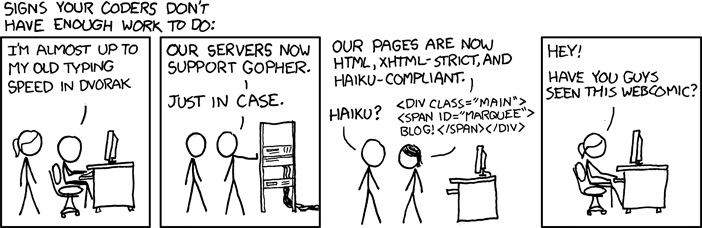
https://xkcd.com/554/
The rollover text will get caught by the autocensor
arthwollipot
Limerick Purist Pronouns: He/Him
Most of my customers already know to send the more detailed and technical of requests by email, and we have a standard escalation process for them, so we rarely get put in that situation.Getting a bit more back on topic, I was probably the nightmare customer of our IT department, because I certainly knew more about the system than at least the front line personnel, so if I was calling them it was because it was a problem that needed either expert knowledge or privileged access. I would also be typically running a number of programs (or apps, as they seem to be called these days) that were non-standard (mostly for fully-justifiable business reasons, a few for personal preference), and I was not doing a simple sales or admin job just using spreadsheets and email, so even if I did agree to giving them remote access to my desktop, it wouldn't help them.
Of course, Tier 1 is 60% knowledge, 20% Google and 20% improvisation.
CORed
Penultimate Amazing
I always liked playing around with the backdrops, usually got a comedy one on it (not that they are usually in sight, I run twin monitors and would love a third lol)
One I always like putting up is this
https://i.postimg.cc/tJt6shym/mypornstash-desktop.png
which sits the 'folder' in a blank spot on my desktop, funny watching people trying to click it LOL
Also fun is to get their desktop icon to a commonly used program, do the same (put a image with the icon they normally click on in its usual spot) then rename the original icon and change its screen display, then move it to a different spot (right next to where it used to be is good or in a far corner) then watching them 'clicking it' repeatedly trying to open their program, then step in when they say it isnt working and discretely click on the new position while moving towards the 'icon' and obviously clicking on it
'works fine for me' as the program starts up, then close it back down and watch them clicking away at the 'icon' again..
Offer helpful hints like "Are you sure you are using the mouse right" and "Maybe click it faster?"
I have a very warped sense of humour...
If you want to be really mean, you can use the "Print screen" button to capture their desktop, paste in into "Paint" (or any image editing program), save it, set it as the background, then delete all of the real icons. It will look just like their regular desktop, but none of the "icons" will be functional.
- Status
- Not open for further replies.