JayUtah
Penultimate Amazing

No.Picture i supplied.
The picture you supplied is far too pristine. It's sharp, well-focused, and probably first or second generation.
Oversampling is part of what makes your method fail. All the images you've used have shown themselves to be egregiously oversampled. This matters because the oversampling requires some sort of interpolation. If you have a 512 x 512 pixel image and you enlarge it to 2048 x 2048, where does the image data come from to fill in all those new pixels? There are a dozen or so methods for interpolating image data, some of them aimed at smoothing the image and others aimed at trying to create a false sense of sharpness in the invented pixels. @Oystein described that to you. Further, if you have a slanted line in an image of low resolution, the antialiasing doesn't scale well. The well-worn Bresenham algorithm for line smoothing borrows from adjacent pixels to minimize the visual effect of the otherwise inevitable stair-stepping. But when you put that through interpolation for resolution changes and then reduce the quantization via a cocked-up luminance map, those stair-steps come back.
No, we need a more rough-and-tumble image, closer to what you are using from 9/11 news coverage. Here's the classic Tiananmen Square photo in the banner of this web page.

Photojournalism of the 80’s and 90’s
Jacob hales discusses why we should appreciate 80’s and 90’s photojournalism…
 heritageherald.com
It's only 72 DPI, so it has a nice garbage resolution for us to play with. I'm using Adobe Photoshop 2025. You're free to determine for yourself whether there is an alpha channel in that image. For those of you playing along at home: there isn't.
Step 1 is to ignore the chrominance information. We care only about luminance, because that's all you're changing with your "Luma" adjustment. To avoid bogging down, I'll just represent that I'm using a perceptual weighting to go from the RGB color space to a pure Y-space image. Since there is very little chromaticity in that photo, it won't matter. Your toy tool is doing this implicitly under the hood, where you can't see it. I'm doing it explicitly.
Let's focus on the brave student. Here he is, in all his 72 dpi pixelated glory...
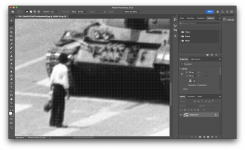
In order to replicate the oversampling in your 9/11 images, we have to oversample here. I'm oversampling by about 4X using bicubic smoothing.
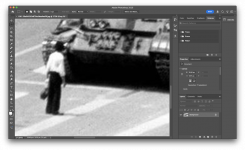
He's not any clearer or fuzzier visually, but when you look closely you see that there are interpolated pixels. Each pixel in the original image has been replaced by about 16 (42) new pixels. The luminosity has been interpolated for the new pixels by means of a particular algorithm. Again, your convenience sources have done this implicitly. I'm doing it explicitly.
Why? Because your method simply amplifies transitional pixels. It turns midtones into white bands of selectively, artificially amplified luminosity. In order for that effect to emerge as an artifact from your images, there have to be a lot of transitional pixels such as those created in oversampling. All those invented pixels from the oversampling are transitional pixels. Your images supply that oversampling by virtue of all the violence that has been done them in their journey to your computer.
Now we apply your inverted-paraboloid luminance map.

And there are your "halos."
I've explained the mathematics to you. I've shown empirically that your "alpha halos" are conclusively and exclusively the artifacts of your misguided application of a luminance map.
Will you kindly concede now?
Last edited: