
You are using an out of date browser. It may not display this or other websites correctly.
You should upgrade or use an alternative browser.
You should upgrade or use an alternative browser.
Gawdzilla Sama
TImeToSweepTheLeg

Waiting for Palemoon 4.0.
My new PC finally arrived (for the 3rd time), so I now have FF4.0. Doesn't really seem much to say about it really. It works. Aside from changing the look of the menus and moving a couple of buttons, there really doesn't seem to be much difference from a user perspective. Of course, this is with a new PC and new version of Windows so there's no way for me to compare speed, but since I never noticed the old versions being slow I doubt I'd see any difference there anyway.
The only real complaint I have is that there doesn't seem to be any sensible reason to have moved the buttons around. They used to all be gathered in one convenient place, now they're scattered all along the top of the screen so I need to actually think about where I'm moving the mouse. Not exactly the end of the world, but deliberately making the new version slightly less convenient seems kind of backwards.
The only real complaint I have is that there doesn't seem to be any sensible reason to have moved the buttons around. They used to all be gathered in one convenient place, now they're scattered all along the top of the screen so I need to actually think about where I'm moving the mouse. Not exactly the end of the world, but deliberately making the new version slightly less convenient seems kind of backwards.
GeeMack
Banned

- Joined
- Aug 21, 2007
- Messages
- 7,235
The only real complaint I have is that there doesn't seem to be any sensible reason to have moved the buttons around. They used to all be gathered in one convenient place, now they're scattered all along the top of the screen so I need to actually think about where I'm moving the mouse. Not exactly the end of the world, but deliberately making the new version slightly less convenient seems kind of backwards.
Right click on an empty space between the buttons to bring up a small menu. Click "Customize..." on that menu. Now you can drag those buttons back and forth on the navigation bar and put them wherever you like. Then click "Done".
ETA: In that Customize box you can also choose to display your buttons as text, icons, or both. Other buttons will be available there, too. Drag any you want onto the navigation bar, and drag anything you don't want from the navigation bar back into that Customize box.
Last edited:
AdMan
Penultimate Amazing

- Joined
- Feb 10, 2010
- Messages
- 10,293
I can't believe the last version of Netscape Navigator came out all the way in '98. Seems like just yesterday I was using it. My how time flies.
Netscape? Ha! Seems like just yesterday I was using this.

AdMan
Penultimate Amazing
- Joined
- Feb 10, 2010
- Messages
- 10,293
Right click on an empty space between the buttons to bring up a small menu. Click "Customize..." on that menu. Now you can drag those buttons back and forth on the navigation bar and put them wherever you like. Then click "Done".
ETA: In that Customize box you can also choose to display your buttons as text, icons, or both. Other buttons will be available there, too. Drag any you want onto the navigation bar, and drag anything you don't want from the navigation bar back into that Customize box.
Helpful--thanks.
gnome
Penultimate Amazing

- Joined
- Aug 5, 2001
- Messages
- 14,864
Netscape? Ha! Seems like just yesterday I was using this.
Noob.
http://homepage.mac.com/machiavel/images/Unix Images/lynx.jpg
AdMan
Penultimate Amazing
- Joined
- Feb 10, 2010
- Messages
- 10,293
Oh, I freely admit I certainly was a n00b when I was using AOL.

Just found a better image of what it looked like when I first started using it (except in 4-bit grayscale on my PowerBook 160).
GeeMack
Banned
- Joined
- Aug 21, 2007
- Messages
- 7,235
Babbylonian
Penultimate Amazing

- Joined
- Feb 22, 2007
- Messages
- 14,103

NoahFence
Banned

I dunno.
I loaded it up, and it promptly rendered flash animation useless. I tried the same games (facebook stuff) on IE and it worked like a charm. Tried to go back to 3.6 but the download is only for FF ver 4.
I loaded it up, and it promptly rendered flash animation useless. I tried the same games (facebook stuff) on IE and it worked like a charm. Tried to go back to 3.6 but the download is only for FF ver 4.
AdMan
Penultimate Amazing
- Joined
- Feb 10, 2010
- Messages
- 10,293
I dunno.
I loaded it up, and it promptly rendered flash animation useless. I tried the same games (facebook stuff) on IE and it worked like a charm.
I don't know what games you are playing, but that shouldn't have happened, so something strange is going on. Do you have the latest Flash player?
Tried to go back to 3.6 but the download is only for FF ver 4.
http://www.mozilla.com/en-US/firefox/all-older.html

NoahFence
Banned
I don't know what games you are playing, but that shouldn't have happened, so something strange is going on. Do you have the latest Flash player?
http://www.mozilla.com/en-US/firefox/all-older.html
Yea, I got all the Adobe stuff up to date. Thanks for the link - I'm gonna give it a whirl
NoahFence
Banned
Whelp...uninstalled 4.0 - went back to 3.6 and all is well.
Strange.
Strange.
RayG
Master Poster

Long time user of Firefox. Downloaded and installed 4.0 RC two days ago, but reverted back to 3.6.15 when I found out the Aeon theme isn't supported in version 4.0.
I'm very particular about the color/appearance of the menu bar/tabs/address line, etc. and if I can't find one that is similar to Aeon, I fear I may have to switch to IE9 (gasp), or Chrome instead.
RayG
Meh, my fears were unfounded.
I installed FF4 anyway, thinking I could always find a theme similar to Aeon. The default install, except for the location of the tabs, and the home button looked like this:
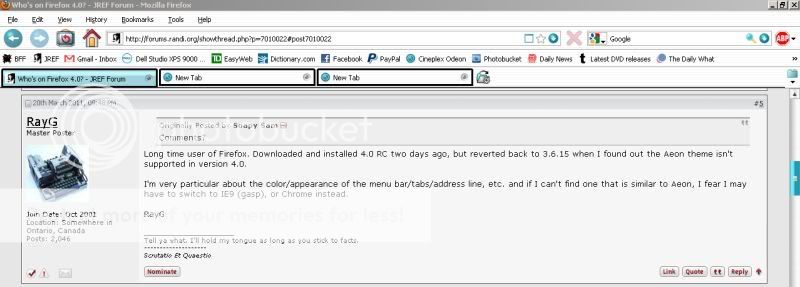
Less than a couple minutes of tweaking was all it took to have it looking like I wanted.
RayG
Right click on an empty space between the buttons to bring up a small menu. Click "Customize..." on that menu. Now you can drag those buttons back and forth on the navigation bar and put them wherever you like. Then click "Done".
Aha! I assumed there must be some way of moving them, but I hadn't managed to figure it out yet.
Speedskater
Thinker
- Joined
- Mar 5, 2006
- Messages
- 188
Went to FF4 on Tuesday.
Somethings happen lot's faster.
Downloads are faster. Mouse movements on the bookmark pull-down menu are too fast.
The font size on some web-pages seems to be smaller.
But the big problem is that many add-ins and most themes are not yet available.
Somethings happen lot's faster.
Downloads are faster. Mouse movements on the bookmark pull-down menu are too fast.
The font size on some web-pages seems to be smaller.
But the big problem is that many add-ins and most themes are not yet available.
Right click on an empty space between the buttons to bring up a small menu. Click "Customize..." on that menu. Now you can drag those buttons back and forth on the navigation bar and put them wherever you like. Then click "Done".
ETA: In that Customize box you can also choose to display your buttons as text, icons, or both. Other buttons will be available there, too. Drag any you want onto the navigation bar, and drag anything you don't want from the navigation bar back into that Customize box.
I just found out that if you remove the Menu Bar, you get an orange Firefox button in the title bar of the window. If you click that button, you get the most useful stuff in a menu, but it takes up much less space inside the window now.
Before I actually had the Tiny Menu extension in FF 3.6 which did something similar, but this takes up even less space. Before I removed my Navigation bar and moved most of the stuff there to the Menu Bar, now they did the reverse, which works equally well for me.
Oh, and I also immediately regrouped those buttons. Maybe functionally less logical, but much less mouse moving!