• Quick note - the problem with Youtube videos not embedding on the forum appears to have been fixed, thanks to ZiprHead. If you do still see problems let me know.

VGA cable connecting

Orphia Nay

Penguilicious Spodmaster
Tagger
Joined
May 2, 2005
Messages
52,473
Location
Australia
I'm trying to sort out cables/adaptors required to set up my new monitor.

The monitor has a 15 hole female VGA port.

My PC has a 9 pin male port.

How do I connect the two?


I have a 15 pin male to male cable, but what else do I need?


Bonus points if you can find what I need for cheap on eBay.
 
I'm trying to sort out cables/adaptors required to set up my new monitor.

The monitor has a 15 hole female VGA port.

My PC has a 9 pin male port.

How do I connect the two?


I have a 15 pin male to male cable, but what else do I need?


Bonus points if you can find what I need for cheap on eBay.

That must be an old PC. Might be just better to get a 15 pin video card that would be better than your existing one off ebay.
 
I'm trying to sort out cables/adaptors required to set up my new monitor.

The monitor has a 15 hole female VGA port.

My PC has a 9 pin male port.

How do I connect the two?


I have a 15 pin male to male cable, but what else do I need?


Bonus points if you can find what I need for cheap on eBay.

If you are looking at a 9-pin male connection on the back of your pc it's likely a serial port or your PC is very very old.
 
I'm trying to sort out cables/adaptors required to set up my new monitor.

The monitor has a 15 hole female VGA port.

My PC has a 9 pin male port.

How do I connect the two?


I have a 15 pin male to male cable, but what else do I need?


Bonus points if you can find what I need for cheap on eBay.
It should be one of these.


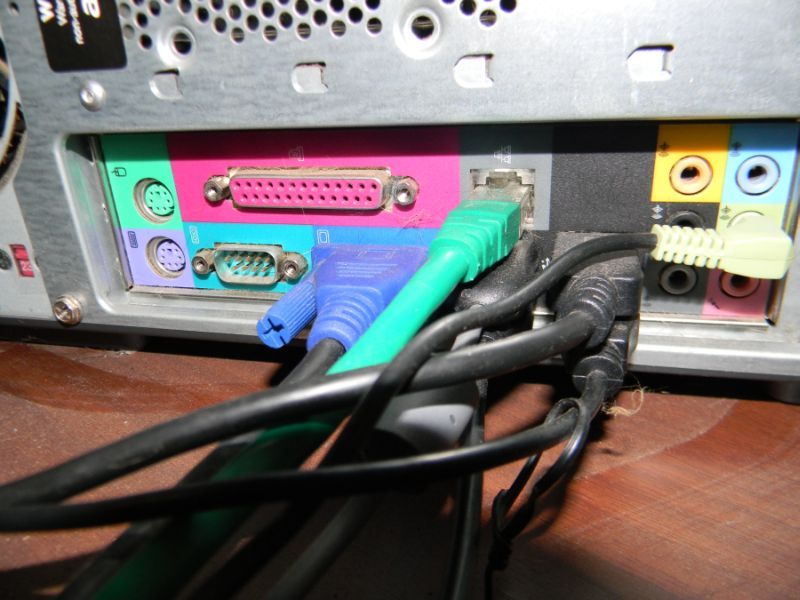
I have a feeling you're looking at the wrong port on the PC.
 
Here's a pic.
Puter_zps895e3981.jpg
 
The 9 pin port is definitely a serial port, not video. The video port is the one with a blue plug into it.
 
When you said your PC has a 9 pin male port, you must have been referring to the other end of the video cable, the end that plugged into your old monitor?

You'll need to pull off the PC end of that cable (the dark blue connector in the center of your photo, as Earthborn said), and count pins. Hopefully it's 15 pin, in which case you just need to buy a standard 15-pin-male to 15-pin-male VGA cable.
 
Ah. Damn.

I wanted to be able to have two monitors, but I guess I can't if I've only got one video card/port.

(Mr Nay bought me a new monitor to go with my existing monitor. The new one was only $7.50 because it had been "repaired" - all that was wrong had been some gunk on the screen that was cleaned off.)
 
If your PC has card slots you could probably plug a second video card in. That's something you'd definitely want to get hands-on help setting up though.
 
You can buy another video card very cheaply these days, I just throw my old ones out now. Maybe I've got one I can send to you if I go through the junk pile.

Aww, thanks so much. I'll gladly reimburse you.

This is the cord that goes with the new monitor:
 

Attachments

  • monitor cord.jpg
    monitor cord.jpg
    36.1 KB · Views: 3

Back
Top Bottom