I Ratant
Penultimate Amazing

- Joined
- Apr 8, 2008
- Messages
- 19,258
.It was called tha "Flap Jack", made by Monogram Model Crop.

That's it.
I done camo and everything on it, and it did look it was formating with the Tristar.

.It was called tha "Flap Jack", made by Monogram Model Crop.

I'd have shot the object the same way.


Sorry, I couldn't stop myself.


Camera men shoot what is in front of a steady camera...
Trying to follow a fast moving object often yields jerky un-centered images. You are better keeping the camera still, and just capture what happens in front of you.
The object moves away quickly, too much so to be followed, with any accuracy.
I'd have shot the object the same way.


As if anymore proof were necessary, this is the photo that was used to create the video in the OP:
http://commons.wikimedia.org/wiki/File:Jerusalem_night_7088.JPG
why do i assume it was a guy who made the video and not a girl? i don't know... it just seems like a guy thing to do.
cheers

The video though has an explanation by the poster that it was faked (I believe it was) however, I'm not sure his explanation is a "valid" one.The video above shows three videos taken from three different angles by three different people—including one woman from Mississippi—synchronized into one.
http://jalopnik.com/#!5750880/is-this-ufo-caught-by-multiple-cameras-a-real-alien-spaceship


No it hasn't, what has been done is that the video with the Americans talking has been proven fake. We are still left with three other videos that are not completely debunked yet
The original OPs post shows a new comparison of three videos; 1, 2 and 4.



technical background (important):
There are 2 ways a camera can capture moving images (a sequence of still frames):
"Interlaced" capture - each captured frame is a actually made up of 2 separate alternating fields each captured at a slightly different slice of time. In postprod, this creates "combing" effect (where the 2 interlaced fields reveal themselves especially for objects or scenes captured while in motion).
"Progressive" capture - each captured frame is a whole frame. But there are 2 types of shutter variants:
"Rolling Shutter" - each frame is captured one line at a time.
Observable artifact #1: creates wobbly deformation of objects or scenes with respect to the orientation of the image sensor (either horizontal or vertical). Common weakness of cameraphones and DSLRs.
Observable artifact #2: external light flashes captured by the camera appear cut off within a single frame (when the duration of the flash is shorter than the time it takes to expose each frame)
"Universal Shutter" - all pixels (and therefore all lines) of each frame are captured all at the same time.
Observable artifact: no wobble, but creates simple motion blur for moving objects or scenes, regardless of image sensor orientation.
VIDEO#4 Debunk Explanation
1. A digital camera can only take a shot either in progressive or interlaced mode, but not both at the same time.
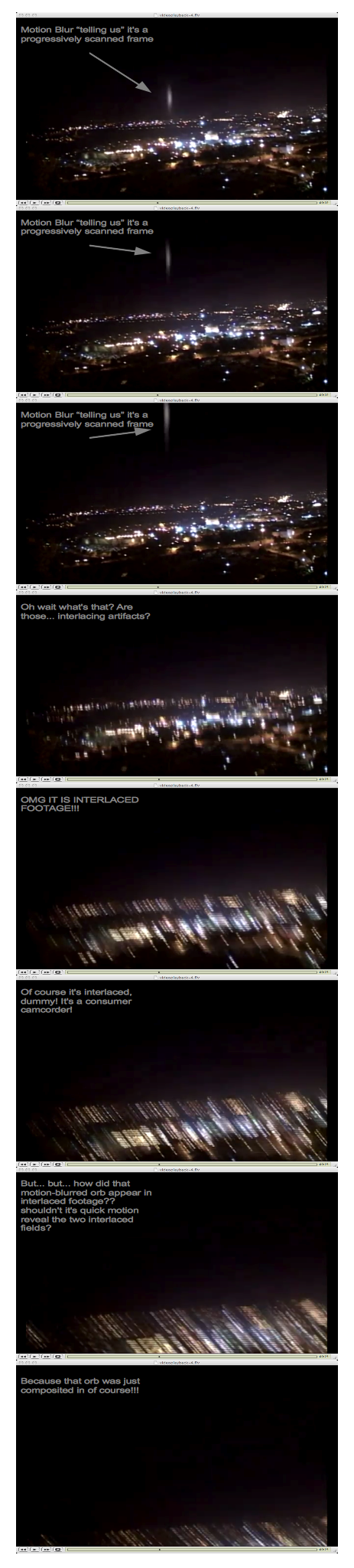
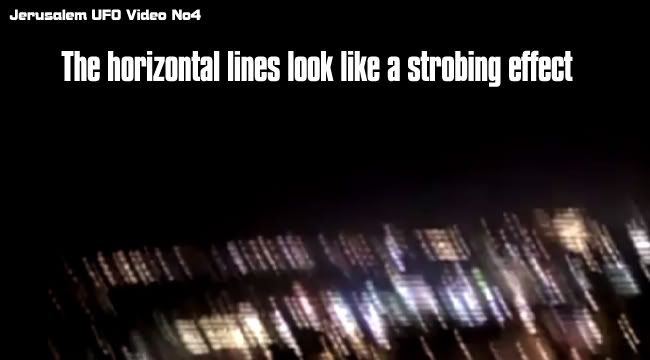
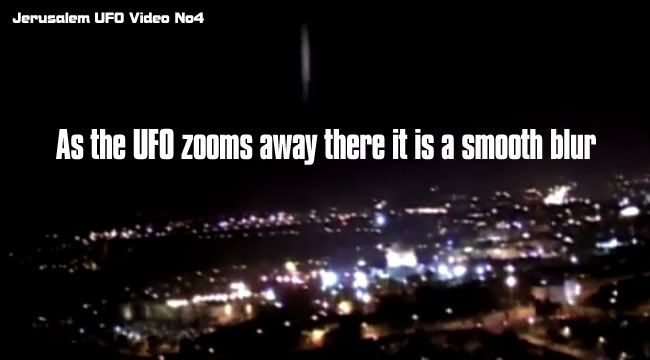
2. This sequence of frames from Video#4 show both interlacing artifacts and motion blur artifacts (supposedly due to quick motion), IN THE SAME FOOTAGE! This can't happen in reality, because the camera is either shooting in interlaced, or shooting in progressive, but NOT BOTH. Either everything that's revealing in the clip reveals interlacing, or progressive - not both.
3. So Video#4 is tampered with in the following sense:
a. The background footage was shot in interlaced mode as most consumer camcorders do
b. The CGI orb was composited into the interlaced background as a progressive image (in fact, the project settings is done in progressive mode - it can't be done any other way unless you know the "nuts and bolts" of your comp system (many thanks to Pinke's U2U for explaining to me how to do that)
c. The resulting final video is exported in progressive frames
d. Video comes out with a mixture of progressive and interlacing artifacts, which no camera can do, and it wouldn't make sense for a camera to do so.
e. Ergo, HOAX

