• Security incident: ISF was recently accessed by intruders. Please change your password, and change it anywhere else you used it. Read more

Fast charging ain't fast. Must be my fault, right? Right?

Oh look another tech support thread without any technical details.

My long experience in IT, troubleshooting tech issues as a career, is that this is almost certainly your fault. Most likely stemming from an inattention to detail and a certain carelessness in approach. Possibly also a failure or inability to internalize important technical advice previously provided.

I'm being blunt, but hey - you asked.

My opinion of where the fault lies would be considerably different, if technical details were forthcoming. Make and model of the device being charged, make and model of charger, any troubleshooting already attempted and how it went, etc.
 
It could be the charger or the cable. (I presume your device itself is capable of fast charging; note, however, that this can be explicitly turned off in the settings - fast charging may be harder on the battery).

For the charger, check the fine print on the device itself. However, do not trust cheap Chinesum devices, they routinely lie about their capabilities (and are often physically unsafe to boot).

Cables are harder to check. I don't know of any way to do so save physically swapping out cables.

In either case, if you want to invest the money you can buy devices that go in between the charger and cable, and will tell you exactly how much current is being delivered.
 
How fast is fast?

Also: What is being charged? How is it being charged? Has a manufacturer promised you a charging time that your mystery device is not achieving? Is it a new or an old device? Are you accurately following the instructions? Did you read the instructions? Is this a real thing, or a hypothetical? Are you trying to fast-charge a dead cat?

A level of detail a smidge above 'absolutely ◊◊◊◊ all' in your question would be handy for those of us that can't read minds.
 
Another possibility -- the battery may be past its useful life. I've replaced a couple in phones (I keep them a long time). Some were relatively easy, others not.
 
Maybe it's the outlet! A mouse might have bitten partway through the wires and is gobbling up the electrons. They're like crack to them!
 
It could be the charger or the cable. (I presume your device itself is capable of fast charging; note, however, that this can be explicitly turned off in the settings - fast charging may be harder on the battery).

For the charger, check the fine print on the device itself. However, do not trust cheap Chinesum devices, they routinely lie about their capabilities (and are often physically unsafe to boot).

Cables are harder to check. I don't know of any way to do so save physically swapping out cables.

In either case, if you want to invest the money you can buy devices that go in between the charger and cable, and will tell you exactly how much current is being delivered.

Missing or damaged communication wires can cause devices to default to lowest charging current.

Note that devices at both ends need to be able to negotiate charging speed in order to provide fast charging.


:D
 
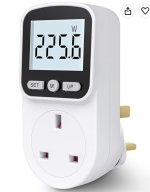
When my wife was fretting over whether her smart watch was charging properly, or if it perhaps needed a new charging lead, I got one of those cheap plug-in power meters. You can see immediately how much power the charger is using. As they read down to tenths of a watt they're good enough even for really low powered stuff. With phones you can see that the charging rate is usually dependent on the PD (power delivery) rating of the USB power supply. The rating will be written on the charger, but in tiny, tiny writing that nobody over the age of 20 can hope to read.

power meter.jpg

I expect they even sell models with whatever crazy style of oddball mains plug you use on your own planet.

The immediate benefit was that she quickly audited her ragbag collection of charging leads and threw about half of them in the bin as intermittent or otherwise not dependable (like, charges her phone but not her iPad for some reason).
 
Last edited:
That device is useful for generic household electrics. There are also specific USB testers; here's an expensive one from Amazon. Simple ones are available for ⅓ the price.
1789603663596.png
 
Another possibility -- the user simply forgot to plug it in.
The first rule (and question to verify) of tech support -- "Is everything plugged in properly?"
(The "properly" is important. Having been shown many variations of the opposite.)
First clarified when trying to help my sister configure her printer, over the phone (pre-video/live cam -- the only worse way is by emails.)
Note: pre wi-fi also
"Is the printer plugged in?"
"It's plugged into the wall, yes."
"But is it plugged into the computer?"
"!!! Oh. That's what that other cord is for!"
 
Last edited:
The first rule (and question to verify) of tech support -- "Is everything plugged in properly?"
(The "properly" is important. Having been shown many variations of the opposite.)
First clarified when trying to help my sister configure her printer, over the phone (pre-video/live cam -- the only worse way is by emails.)
Note: pre wi-fi also
"Is the printer plugged in?"
"It's plugged into the wall, yes."
"But is it plugged into the computer?"
"!!! Oh. That's what that other cord is for!"

I once got called to someone in marketing complaining their printer wasn't working (I think I spent more time on stupid printer problems than anything else), she had a laptop, and a docking station, but she'd decided she didn't like the docking station and had plugged the network cable and power directly into the laptop instead. What do you think the printer was plugged into?
 
The phone says "fast charging" but then it doesn't. Will go in search of a new battery. If that doesn't work I will sacrifice the next door neighbor's kid and his boom box to the Ohm My Gods.
This happened to me with both USB-C cable and wireless pad- both times, it meant bad connection. With the cable, it was because the charging port was damaged. With the wireless, it was because it wasn't sitting in exactly the sweet spot (with the case on) to charge right. It would light up with a green fast charging circular indicator, then stop taking a charge at all. Being precise with the charger placement worked, and removing the case made the problem vanish.
 

ISF - Join now!

Every member here is approved by hand. No bots, no spam, just people who care about evidence and honest debate.

Membership is free!

Create your free account

Back
Top Bottom