Robert Prey
Banned
- Joined
- Sep 8, 2011
- Messages
- 6,705
No, they are not. Conceptually they are very different. In the PDF design rationale, they are very, very different. PDF files are just containers for lists of objects. For the purposes of clipping (which eases the task of rendering in a viewport), objects may be grouped by proximity. Typically, however, an object group contains only one object -- one of the PDF primitives.
In the simplest possible PDF describing a scanned document, the single object represented would be a pixel map, and it may be accompanied by a clipping mask to hint to the renderer the maximum extent of the object in document coordinates.
But PDFs rarely occur in their simplest possible form. When "optimized," certain operations are performed on the pixel map. In many cases these operations result in complex objects such as transformed primitives. Or in other cases, scanned text can be replaced by a PDF text object, an associated font object, and -- as always -- a clipping mask that hints to the renderer whether this object is visible in the current viewport.
If, for example, a text object is not inside the viewport, the clipping mask will alert the renderer to this fact, and the renderer will not bother loading the font, computing the normal text extents, etc. This saves rendering time.
In contrast, a layer in Adobe creative terms almost always extends to the full canvas and is, itself, a container for any number of application-specific primitives. In Photoshop the primitives are almost always pixel maps, but may include text objects and paths. The layer itself is an untyped element, as opposed to PDF object groups which are typed. And in Photoshop, adjustment layers can simply apply a programmatic modification to the accumulated image. PDF objects and object groups cannot modify other object groups, except to obscure them in the bottom-up rendering order. In Illustrator the layer contains paths, but may also contain encapsulated pixel maps. Again, Illustrator layers are untyped.
Because of that typing difference, Adobe creative products cannot directly convert their layers (or even their primitives) one-to-one to PDF objects or object groups. And in fact many Adobe users complain about the inconsistent data type conversions that occur among Adobe products when exporting as PDF.
No. Illustrator very plainly distinguishes between object layers and groups.
You told us specifically that if we opened the PDF in Illustrator, we would see several Layers. In fact that is not the case, and it illustrates that you yourself didn't do what you admonished us to do. You were bluffing.
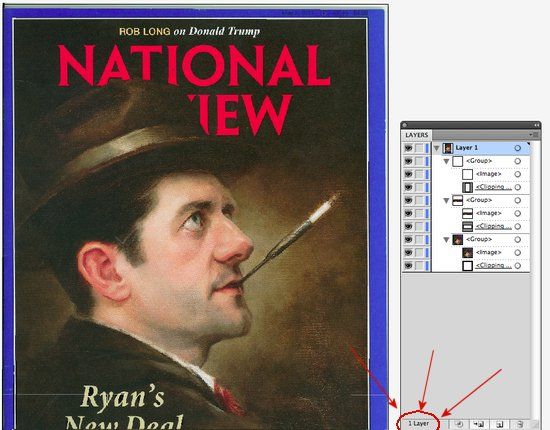
We get one Layer. And if we expand that Layer, we get several object groups, which are Illustrator's half-hearted attempt to render a PDF primitive in a way that Illustrator can manipulate. PDF object groups are not native to Illustrator, and Illustrator can do very little with them. Yes, you can show and hide them, just as with any Illustrator primitive. But that's about it.
The bottom line is that you told us the facts were one thing, but they turned out to be a different thing altogether and your critics were the first to tell you this. Now you're desperately trying to play word games to cover your gaffe.
That proposition has been tried in the court of public opinion, and you lost. And in fact now you're quite obviously playing word games. You got caught fibbing about what Illustrator would do with that file, and now you're trying to backpedal away from it by waving your hands and declaring object groups and layers to be the same thing in PDF terms.
I wonder when you're going to stop putting words in my mouth and thoughts in my head for the purposes of easing your rebuttals. Does what I actually say scare you that much?
I congratulate you as the only alleged computer "expert" on the planet who could only find one layer in the Obama PDF.


 FAIL FAIL FAIL.. We are talking about ILLUSTRATOR!