Nonpareil
The Terrible Trivium

Right... Now my memory was formed by something unavailable in 2003.
Which is irrelevant, as it has been available since then.
Amazing...
Not really. It's entirely mundane.

Right... Now my memory was formed by something unavailable in 2003.
Amazing...

If only we had a verified record of you mentioning the oscillations back in 2003...Right... Now my memory was formed by something unavailable in 2003.


So, you haven't looked, have you?

...
But if you have any favourites, please feel free to post them.
If only we had a verified record of you mentioning the oscillations back in 2003...
Yeah, I think it's a fake too. It seems to be a compilation of some ufo sightings. As well, those trees look suspiciously like the one's in those fake Miami vids. Hopefully the guy who has faked these will be found and disposed of soon.
You don't immediately see the inconsistency?
You don't immediately see the inconsistency?
The disappearing tree? (on the right of shot that the rings go behind and that isn't there at the end).
You know about 'Vue' right?
No you didn't spot the disappearing tree or no you haven't heard about Vue?No...
Find out who made it then and write and ask them to re-render a version of it with less. Also ask him to fix that disappearing tree.I would have liked there to have been fewer high wires.
No you didn't spot the disappearing tree or no you haven't heard about Vue?
...
Find out who made it then and write and ask them to re-render a version of it with less. Also ask him to fix that disappearing tree.
When the white drops fall from the big thing and the camera points down to the thing that looks like a rocket launch that is expelling smoke rings. The rings go behind a rather large tree/bush. At the end of the sequence when the camera pulls back to show a fuller scene, the rather large tree that the smoke rings went behind isn't there anymore.What disappearing tree?
When the white drops fall from the big thing and the camera points down to the thing that looks like a rocket launch that is expelling smoke rings. The rings go behind a rather large tree/bush. At the end of the sequence when the camera pulls back to show a fuller scene, the rather large tree that the smoke rings went behind isn't there anymore.
Right... Now my memory was formed by something unavailable until 2005.
There is no one more capable than me.Could you, or someone more capable, do a stilled screen shot with a nice red circle around the missing tree?

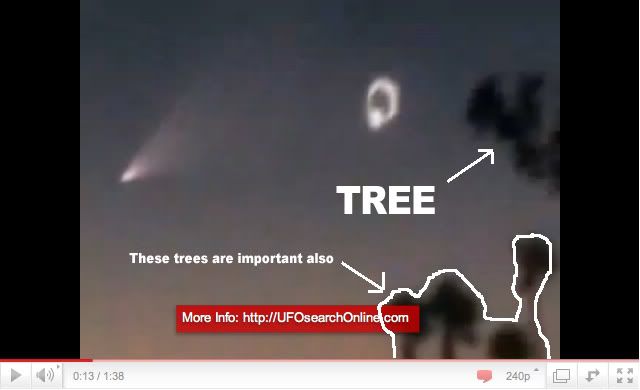
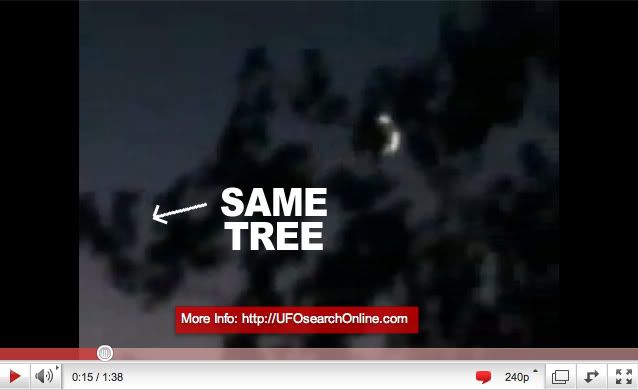
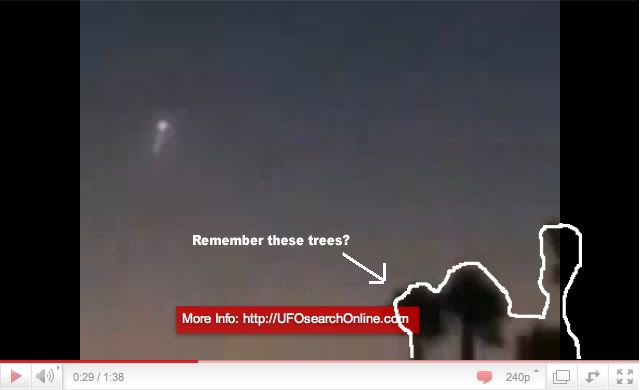
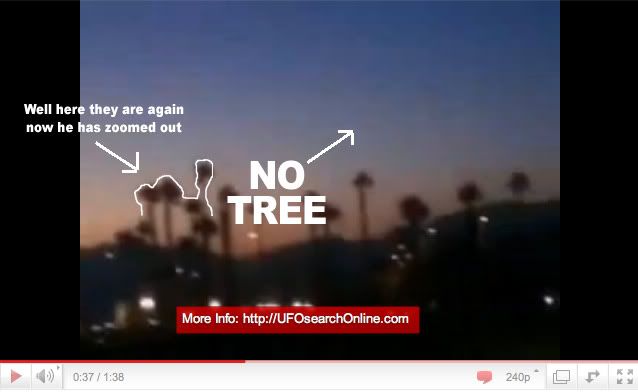
I've left the YouTube time code on so you can match them up to the footage.
...
Revealing a rather treeless foreground.
There is a momentary 'shake' of the camera where the trees go out of the field of view, but no detectable 'cut', then when the trees come back into view, they match up accurately with how they were previously and at that point the camera zooms out.Very cool.
Although, I assume, a slight change in camera angel could account for that too. The large trees look relatively close, and there is a cut before the tree disappears, right?
As the camera pans quite a distance to the right showing no sign of a tree in the foreground and also remember that when the disappearing tree is in shot, the camera is zoomed in so it's not as close as it appears, I would say it's highly unlikely that a simple move to the left would result in the tree not being within the field of view of the camera.Isn't it more likely that someone took a few steps to the left, rather than editing a tree out of a video clip?
There is a momentary 'shake' of the camera where the trees go out of the field of view, but no detectable 'cut', then when the trees come back into view, they match up accurately with how they were previously and at that point the camera zooms out.
As the camera pans quite a distance to the right showing no sign of a tree in the foreground and also remember that when the disappearing tree is in shot, the camera is zoomed in so it's not as close as it appears, I would say it's highly unlikely that a simple move to the left would result in the tree not being within the field of view of the camera.
But I also don't think it was "edited out". With Vue, you can simply set something to not be there anymore. No work required apart from setting a keyframe at that point and deleting the object you don't want (two mouse clicks and it's done).
Also a massive red flag is that there is no information with this video.
No location, No names, No Date, No nothing.
No, the camera inexplicably just points up for less than a quarter of a second, not enough time to move a significant distance.So, there's a 'shake', possibly caused by someone running a few steps?
If you look at my first and second screen grabs, they actually overlap (the branch the white arrow point to on both). So you can see the extent of the pan to the right in relation to the distant tress I've outlined.And in the scene where the tree(s) are missing, the shot doesn't pan as far to the right, as the first, does it?
Depending on what you're doing with it Final Cut is good for video editing. Adding Adobe Premier will give you plenty of great sfx. Vue is not video editing software, it is 3D modelling and animation. It's a great bit of software though and eventually I'd like to buy a copy too.I am sort of building a mobile podcasting studio, but all I have available is iMovie, which is minimalistic to say the least. Vue sounds awesome! My next purchase was going to be a version of Final Cut.
I wasn't really talking about 'on-screen information'. I hate that too. What I was talking about is that the video is not accompanied by any information relating to it. So the location can not be identified (as you would expect if the location was totally fictitious and only generated on a computer).*I NEVER shoot with the time and date stuff on. It is ugly, takes up space, and is utterly meaningless for most of what I shoot. To turn it ON, you'd have to set it correctly, and then turn it on within the Menu and Settings area. If I saw a U.F.O., I'd probably just hit the record button and start shooting. But that is just how 'I' roll...I don't presume to speak for anyone else.
