Moderated Iron sun with Aether batteries...

Status
Not open for further replies.
Take a picture of a ball.
Make a mark on the picture, just below the limb of the ball.
Hold the ball oriented just the same as it is in the picture.
Make a mark on the ball that matches the mark on the picture.
Is the mark on the ball under the surface of the ball?
No, the mark on the ball is on the surface of the ball.
The mark on the 2-dimensional picture appears just below the limb of the ball.
The mark on the 3-dimensional real ball appears on the part of the surface of the ball that is extended towards you as you look at it.
Michael, can you address this please.
 
Is there perhaps a PR department at NASA which Michael could email, to ask if the picture in question has had a circular green filter added to it or if that is a real feature of the sun?

Think of the pages it might save.
 
Is there perhaps a PR department at NASA which Michael could email, to ask if the picture in question has had a circular green filter added to it or if that is a real feature of the sun?

I think you may be a bit confused about what the filter is. The filter didn't create the green circle. The filter made the dark circle inside the green. Without the filter, the green would extend inwards.

But you (generically, not just you Jack) don't need to ask NASA. You can grab raw images of different wavelengths and combine them yourself, like I did.
 
Then you really should have no problem at all taking that bet on your public position based on the outcome of the 6 step RD "test" I suggested?

How can anyone accept a bet with you knowing that you will misunderstand or reject any scientific evidence as math bunnies or some other dismissive posturing. You have amply demonstrated that you do not understand the nature of scientific evidence and the methods of science. It would be like betting someone from the Greek bronze age about a proof of the nonexistence of some river god.
 
Last edited:
I think you may be a bit confused about what the filter is. The filter didn't create the green circle. The filter made the dark circle inside the green. Without the filter, the green would extend inwards.

Depends on how they did it. I kinda think that the dark inside the green (Line A in phunk's diagram) is the real limb. That makes the green area a result of the chromosphere shining through a 30-40% transparent blue photoshop disk, with the edge of the disk represented by phunk's B line.

At least, I could get results very much like the SDO composite image that way.
 
I think you may be a bit confused about what the filter is. The filter didn't create the green circle. The filter made the dark circle inside the green. Without the filter, the green would extend inwards.

But you (generically, not just you Jack) don't need to ask NASA. You can grab raw images of different wavelengths and combine them yourself, like I did.

Perhaps I'm mistaken, then---I thought the filter was as follows: the central part of the image (filter #1) shows a the Sun as a black disk with a rough edge, and also includes a bit of the corona, which looks green. Filter #2, applied to the outside, makes the rest of the corona look red/orange. The "filter edge" is the line between the green and the orange. If Filter #2 were not applied, the Sun would look like a black disk in a washed-out green corona. If Filter #1 were not applied, you'd see the red-orange corona going right to the edge of the black disk, and the features on the face of the disk would be underexposed and hard to see.

GeeMack, can you clarify?

ETA: what Dasmiller said.
 
Last edited:
Perhaps I'm mistaken, then---I thought the filter was as follows: the central part of the image (filter #1) shows a the Sun as a black disk with a rough edge, and also includes a bit of the corona, which looks green. Filter #2, applied to the outside, makes the rest of the corona look red/orange. The "filter edge" is the line between the green and the orange. If Filter #2 were not applied, the Sun would look like a black disk in a washed-out green corona. If Filter #1 were not applied, you'd see the red-orange corona going right to the edge of the black disk, and the features on the face of the disk would be underexposed and hard to see.

GeeMack, can you clarify?

ETA: what Dasmiller said.

This was my take.
 
Perhaps I'm mistaken, then---I thought the filter was as follows: the central part of the image (filter #1) shows a the Sun as a black disk with a rough edge, and also includes a bit of the corona, which looks green. Filter #2, applied to the outside, makes the rest of the corona look red/orange. The "filter edge" is the line between the green and the orange. If Filter #2 were not applied, the Sun would look like a black disk in a washed-out green corona. If Filter #1 were not applied, you'd see the red-orange corona going right to the edge of the black disk, and the features on the face of the disk would be underexposed and hard to see.

GeeMack, can you clarify?

ETA: what Dasmiller said.


The SDO team told me the original colorized images were made in red, green, and blue. The red showed the 211Å filter, the green showed the 193Å filter, and the blue showed the 171Å filter. When you separate the three original colors they look (something) like this...

sdored.jpg


sdogreen.jpg


sdoblue.jpg

To me it looks like the composite was made by layering those three colored originals then placing a round darkening filter over the whole thing. That filter was maybe 20 pixels larger than the disk area of the three images, and that's what we're seeing as a sharp line. The filter was probably mostly a combination of red and green. The purpose, of course, was to make a pretty picture for public relations, so the amount and color of the filter would have been done to balance the input colors and to make the corona stand out.

Of course the separation can't be done perfectly because although we can pick out the red, green, and blue, any additional layers or other colors would become part(s) of those red, green, and blue results.

In the red image you can see that crisp division at Arrows "A" and "B". It goes pretty much all the way around the image like that. In the green separation you can see how that crisp division shows at Arrow "A", but at Arrow "B" there are just some distorted pixels, probably compression artifacts. Those differences would be the result of the reds and greens being sort of neutralized when laid over their own color.

In the blue image there are a few of those distorted pixels, but no crisp darkened division at either arrow. In my opinion the round gradient filter was a combination of green and red laid over the composite image. There would have been little need to dim the blue since it's obviously a much darker original. It could even be that the blue was a layer on top of the red, green, and gradient filter.

That explanation might be off by a bit, but it would explain the crisp edge and the fact that so much of that size discrepancy shows as the green strip Michael mistakenly believes is significant to his claim.

 
Depends on how they did it. I kinda think that the dark inside the green (Line A in phunk's diagram) is the real limb. That makes the green area a result of the chromosphere shining through a 30-40% transparent blue photoshop disk, with the edge of the disk represented by phunk's B line.

At least, I could get results very much like the SDO composite image that way.

That's how I interpreted it.
 
I decided to go ahead and do this myself. I combined this image
http://aia.lmsal.com/public/firstlight/20100418_000108/f0171.gif
and this image
http://aia.lmsal.com/public/firstlight/20100418_000108/f4500.gif
using photoshop. I made the 4500 Angstom image a 50% opaque layer on top of the 171 Angstrom image (in case you want to replicate this process). Here's a cropped section from the combined image:

[qimg]http://www.internationalskeptics.com/forums/imagehosting/thum_11924be71330684bb.jpg[/qimg]

Note that we get a boundary in this image. But it's not an overlap of the 171 Angstom image and the 4500 Angstrom image, it's a gap. And the gap isn't just visible in the section I cropped, it goes all the way around.

So using simple image analysis, I've just demonstrated that the iron ion emissions originate far ABOVE the photosphere. Oops.

FYI Zig, you hit pay dirt on that one. I've been overlaying the GIF images today and I'm still digesting them. You're right about they way those two images overlay. You might however overlay the 1700A GIF and the 4500A GIF, and you'll see why I'm still having a problem. I do hear your argument however, and there seems to be merit to it. I still can't make any sense of the 1700A and 4500A overlay image, but I see what you mean about the 4500A and iron ion overlays.
 
FYI Zig, you hit pay dirt on that one. I've been overlaying the GIF images today and I'm still digesting them. You're right about they way those two images overlay. You might however overlay the 1700A GIF and the 4500A GIF, and you'll see why I'm still having a problem. I do hear your argument however, and there seems to be merit to it. I still can't make any sense of the 1700A and 4500A overlay image, but I see what you mean about the 4500A and iron ion overlays.


He's yanking your chain, Michael. The fact that you don't actually understand what he's saying only goes to support the conclusion that you aren't qualified to understand solar imagery of any sort. :p
 
sd01-2.jpg


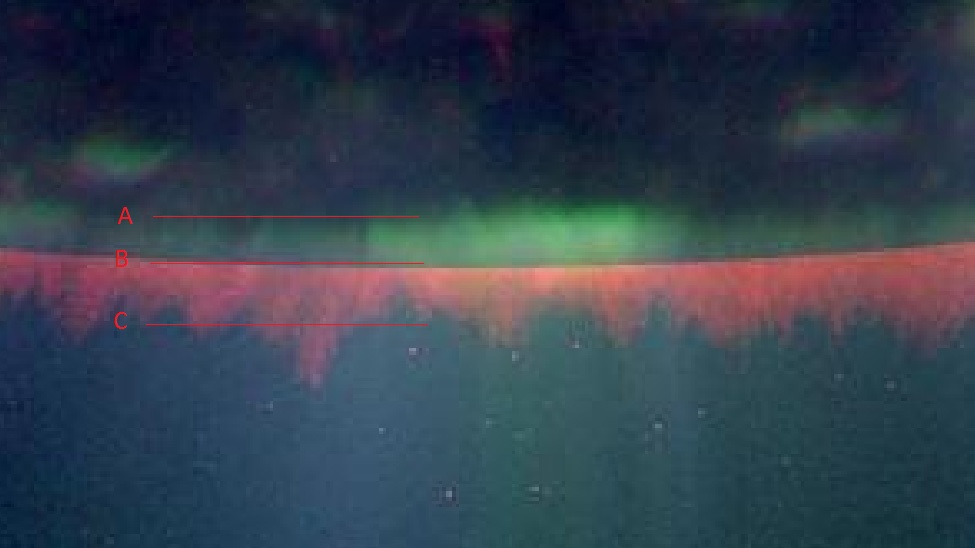
Michael, which line points to the boundry between the photosphere and the chromosphere?
Incorrect. The answer is A.

The A location is the surface of the sun, and where the RD outline will end. The jagged edges are due to the iron in the base of the coronal loops that hasn't yet been fully ionized. As it gets further from the opaque surface, it eventually is fully ionized and it turns the atmosphere a yellow or blue or green depending on which iron line(s) we use and what color we assign each wavelength.

The A location is the surface of the sun, that much you're right about. It's the top of the photosphere.

The region from A to B is suppose to "opaque" to these specific wavelengths in "meters" in any atmosphere that is not heavily (I mean heavily) ionized. That's not a problem for my solar model, but it's a giant problem for the SSM.
The region from A to B is not supposed to be opaque, it is the chromosphere seen through the edge of the filter used in the PR image. The region from A to B is the just the bottom of the region from B to C. The chromosphere is the region between A and C.

Are the raw images used to create that composite available?
 
Artifact Green

I already did that above. A TRACE image that shows the limb and does not have that green feature in it (the very first TRACE image I looked at): http://trace.lmsal.com/POD/images/T195_20060802_183218.jpg
Boloney. I see an "opaque" (GM style) horizon on that image, with the same "jagged" edges and everything. The only area that doesn't show that pronounced jagged horizon line is the area that is highly active on the left that just happens to be in front of the opaque horizon line. Every other area of the image shows that distinctive jagged opaque line on the horizon.

I said ... "does not have that green feature in it"
Then you said ... "I see an "opaque" (GM style) horizon on that image, with the same "jagged" edges and everything."
Which part of the word "GREEN" was too much for you to handle? Like I said, that specific green feature, like the one you show in this post: http://www.internationalskeptics.com/forums/showthread.php?postid=5915045#post5915045 is not found in the TRACE image, and that is what you challenged us to find. That green feature is the artifact. I have no idea what you are talking about now, nor why you think it is important.
 
Artifact Green II

You ignored that SDO iamge entirely and bought some ridiculous notion that limb dimming is some kind of "artifact" when it is clearly present in *EVERY* iron ion image.

That's a damn lie and you know it. I never said any such thing. Show me the post where I said any such thing. The only "artifact" I ever identified is that green feature, the one you highlight here: http://www.internationalskeptics.com/forums/showthread.php?postid=5915045#post5915045. That's an artifact. I have no idea what your "limb dimming" is supposed to be, but I don't know of any example of you even mentioning "limb dimming" or "limb darkening" until we told you about it (feel free to show us where you brought up the topic before you were told about it).
 
The SDO team told me the original colorized images were made in red, green, and blue. The red showed the 211Å filter, the green showed the 193Å filter, and the blue showed the 171Å filter. When you separate the three original colors they look (something) like this...

[qimg]http://img688.imageshack.us/img688/2593/sdored.jpg[/qimg]

[qimg]http://img63.imageshack.us/img63/237/sdogreen.jpg[/qimg]

[qimg]http://img694.imageshack.us/img694/5499/sdoblue.jpg[/qimg]​

To me it looks like the composite was made by layering those three colored originals then placing a round darkening filter over the whole thing. That filter was maybe 20 pixels larger than the disk area of the three images, and that's what we're seeing as a sharp line. The filter was probably mostly a combination of red and green. The purpose, of course, was to make a pretty picture for public relations, so the amount and color of the filter would have been done to balance the input colors and to make the corona stand out.

Of course the separation can't be done perfectly because although we can pick out the red, green, and blue, any additional layers or other colors would become part(s) of those red, green, and blue results.

In the red image you can see that crisp division at Arrows "A" and "B". It goes pretty much all the way around the image like that. In the green separation you can see how that crisp division shows at Arrow "A", but at Arrow "B" there are just some distorted pixels, probably compression artifacts. Those differences would be the result of the reds and greens being sort of neutralized when laid over their own color.

In the blue image there are a few of those distorted pixels, but no crisp darkened division at either arrow. In my opinion the round gradient filter was a combination of green and red laid over the composite image. There would have been little need to dim the blue since it's obviously a much darker original. It could even be that the blue was a layer on top of the red, green, and gradient filter.

That explanation might be off by a bit, but it would explain the crisp edge and the fact that so much of that size discrepancy shows as the green strip Michael mistakenly believes is significant to his claim.

Why does there appear to be a strip around the red image, which seems to be similar to the green strip MM has been talking about?
 
PS, the "feature" we are talking about appears in "every" single (not a few) iron ion image of the sun. Find me one iron ion wavelength in the SDO images or any limb image of TRACE that does not display that exact same "feature". An "artificact" is something that isn't really there. That limb darkening is there in every iron ion wavelength PS. Just find me one released SDO iron line image that doesn't have that "feature".

How ignorant of you, MM:
First asked 28 April 2010
Originally Posted by Reality Check
Michael Mozina,
Perhaps you can explain why the first image in the SDO images gallery (the second image is the one you selected), does not have any "green line".

There is no limb darkening in any of the
  1. first light
  2. public relations
  3. pre-configuration
    SDO web site
    After a series of engine burns SDO has reached geosynchronous orbit. Data will be available after a series of activities that include powering up the Ka-band transmitter, opening the instrument doors, and configuring the instruments to start science observations. This will happen approximately in mid-May, and the SDO team is looking forward to the new data.
images on the SDO site.
Limb darkening is consistant around the limb. The green blur added during an artist creating the first light, public relations, pre-configuration images is not.
 
Last edited:
http://aia.lmsal.com/public/firstlight/20100408_013015/f0193.gif

I guess I need to tackle this limb dimming "artifact" claim head on. One of you needs to use this image (or any iron ion SDO image) to show me where the "limb dimming" is not present. Which position on the clock does not show that jagged limb dimming feature?
I guess that the ignorance is large in you still Michael Mozina:
  1. A nitpick: There is no such thng as "limb dimming". There is limb darkening.
  2. There is no "limb dimming" artifact in the first light, public relations, pre-configuration image that you are obsessed with.
    The SDO image"green line" is a processing artifact as confirmed by the NASA team.
  3. There are no there is no "limb dimming" in the any of the first light, public relations, pre-configuration images because they are:
    • first light,
    • public relations,
    • pre-configuration images.
  4. There is no dimming along the limb at all in that image. There is some jagged brightening claused by solar activity seen side-on at the llimb.
The real ignorance is about what limb darkening actually looks like in real solar images created from scientitific data (not PR images). It is consistant around the limb. The fact that the feature you are obsessed with is "jagged" means that it is not limb darkening .

So the answer to this question is:
Limb darkening is not present at all positions on the limb in that image.
:dl:
 
Yes. We've discovered that Jupiter has a solid iron surface!


(Or maybe this just goes to show that only a true dyed-in-the-wool crackpot would fall for the optical illusion created by the dark light pixel arrangement in a running difference graph.)

I see the Eye of Sauron!
 
Why does there appear to be a strip around the red image, which seems to be similar to the green strip MM has been talking about?


The red is darker in that strip because there was less red in the RGB mix of those pixels than in the adjacent pixels. That means more green and/or blue was added to the pixels in that area. Without much doubt that is the result of adding a large circular overlay to darken the entire central part of the image. You'll notice how the lighting features continue above and below that crisp edge, particularly in the green image. They don't start and end at that line; they just get immediately darker and lighter as they go past there.

What that abrupt change and darker strip does not mean? It does not show a layer of some kind of mystery plasma that is exactly as transparent looking straight down through 4,800 kilometers of it as it is when looking edge-ways through 80,000 kilometers of it.
 
Cool! :)

For completeness, was the process you used to create this the same as the one for creating the RD movie of the SDO (171A?) images you posted earlier in this thread? Apart from the colourisation of course!

Could you take one image from the RD movie, crop it so that it includes only part of Jupiter (i.e. no limb), and increase the contrast so the brightest pixels are saturated (white) and the darkest zero (black)? That way we could make a direct comparison with the first image on MM's website (of course, the image resolutions is different ...).


Yes, I use the same processes to make all these running difference images/videos. The way I do it is the same way NASA does it. Conceptually it's simple, requiring no more understanding of math than adding and subtracting three digit numbers, two digit if you do it in hexadecimal like most image processing programs use. It can be done a frame at a time in a graphics program like PhotoShop, although there are a couple more steps involved. The math requires making pixels that might go way beyond 0xFF, the highest value used to designate pixel brightnesses, so intermediate frames are necessary to manipulate it mathematically and graphically. The video software I use does that addition and subsequent subtraction without requiring a stop on an actual image, so going over 0xFF in a middle step isn't a problem.

There really isn't enough contrast in that little Jupiter video to go all the way to whites and blacks and still leave any amount of detail. But enlarging it, cropping it, colorizing it, and boosting the contrast does show what making a running difference image/video can do. As far as creating the illusion of three dimensional features, it closely resembles that "gold" image Michael continues to spam us with here.


The position of the great red spot advances in each frame of the original video, so the difference typically shows as a lighter area on the leading side of the rotation and a darker area behind. If we were to accept Michael's interpretation of running difference images, we would have to conclude that we're seeing through some thousands of kilometers of opaque material on the surface of Jupiter, and actually seeing some huge crater-like physical structure underneath.

I am preparing a couple other pieces that will even more clearly show how a running difference image simply is not what Michael mistakenly believes it to be. I will post some additional material later.
 
Status
Not open for further replies.

Back
Top Bottom