Dear Users... (A thread for Sysadmin, Technical Support, and Help Desk people)

Status
Not open for further replies.
Yep, the bank I worked was mad for spreadsheets for everything. No courses so I taught myself. So I learned to write my own functions etc. I looked at some of the nested excel cell formulae and decided that way lies madness. IIRC it started with some limit in conditional formatting, not as many options as I needed I think.
 
Yep, the bank I worked was mad for spreadsheets for everything. No courses so I taught myself. So I learned to write my own functions etc. I looked at some of the nested excel cell formulae and decided that way lies madness. IIRC it started with some limit in conditional formatting, not as many options as I needed I think.

I don't know if it's just me but I find doing complicated stuff in Excel really quite baffling. I have an MSc that was basically AI programming and can (or rather could) do quite clever things in C and Prolog, but stuff like as you say nested cell formulae escape me.
 
I don't know if it's just me but I find doing complicated stuff in Excel really quite baffling. I have an MSc that was basically AI programming and can (or rather could) do quite clever things in C and Prolog, but stuff like as you say nested cell formulae escape me.


Same. Near 40 year IT career as a systems programmer, developer, troubleshooter with certificates for ITIL, MQ admin etc etc, 15 languages on multiple OSes and excel formulae just do my head in. They offend all my instincts and training about how clear a solution should be. I keep seeing complicated cell formula as answers to questions and thinking "it looks clever but how do I prove it's right?" So I write a function using VBA and if it's for someone else, slap an action button or 2 on it.
 
I've sadly learnt that "very experienced with Excel/Word/PP " on a CV means "I can click on the icon and load the program and then I can load a spreadsheet/word/PP file (if the file manager dialogue automatically defaults to the correct folder) and then move it up and down the screen"
 
Yep, the bank I worked was mad for spreadsheets for everything. No courses so I taught myself. So I learned to write my own functions etc. I looked at some of the nested excel cell formulae and decided that way lies madness. IIRC it started with some limit in conditional formatting, not as many options as I needed I think.

I don't know if it's just me but I find doing complicated stuff in Excel really quite baffling. I have an MSc that was basically AI programming and can (or rather could) do quite clever things in C and Prolog, but stuff like as you say nested cell formulae escape me.


One company I worked for (as an engineer) had a training program where they would send you training CD's for the software you were interested in. That's how I started learning visual basic.

For Excel, macro's and the macro recorder were my go to tools for automating complex tasks. You do it once with the recorder on, make some modifications to the macro, assign a hot key combination and now anytime you activate the macro it does all the work. I even made self deleting macros that, after they completed, would delete the majority of themselves so they couldn't be accidentally reactivated.

From product cost and estimate sheets to engineering test reports, once the raw data was in the respective data bases. A couple of key strokes to start the macros and the relevant documentation would assemble itself. Even the Word documents had canned statements that would self assemble based on the results of, or even nature of, the test that had been preformed.

For the one company I was working at, just about everything was MS based (or that Four-strike or something data system) so the macros were all I needed. When I went to another company much of their data bases were Oracal, which didn't play nice with MS. So I needed to learn Visual basic to pull the data I needed from a regular bulk data dump file from the Oracal databases and to do the macro kind of stuff I was doing before. It also was able to do more complex stuff like search a server for drawing files and extract the last change date and drafter. I was working on a global search and replace program for just one of those data elements but then the company was sold and the training program was from that larger parent company. So I had to send the training discs back to them.


ETA: Looks like that other database system was Fourth Shift.
 
Last edited:
When I went to stupid technical school to get my associates degree in programming we were required to take an intro course to Microsoft Office programs: Excel, Access, Word, and PowerPoint. The lady teaching it told us if we learned only half of what Excel could do we could make a very good living with just that. She was right. In the years since I've done just as much at work using Excel as I've done using all my other fancy programming skills put together. And I've never even done the really fancy stuff like macros! The fanciest I get is vlookup.
 
When I went to stupid technical school to get my associates degree in programming we were required to take an intro course to Microsoft Office programs: Excel, Access, Word, and PowerPoint. The lady teaching it told us if we learned only half of what Excel could do we could make a very good living with just that. She was right. In the years since I've done just as much at work using Excel as I've done using all my other fancy programming skills put together. And I've never even done the really fancy stuff like macros! The fanciest I get is vlookup.

Don't sell yourself short, in the other jobs I never had any call to use the vlookup functions. Once I got this job, I was setting up databases and display sheets to show the current status of our equipment (hundreds of units). vlookup and conditional formatting did the trick so that a single display sheet shows current operational and/or maintenance status of a given equipment set, by location, and updates whenever the data in the databases changes. As I hadn't used it before it took me quite a while to get the hang of the vlookup functions.

The macro recorder makes not only the macros easier but can even help with the syntax of what to change to get it to do what you want it to do. By recording macros as you do things just a bit differently you can compare the changes to get a better understanding of what to modify and how, in order to get it to do what you need.
 
Oh, vlookup is awesome. Frequently instead of messing around with SQL I just dump the raw data into two separate tabs in Excel then do a vlookup to compare them. I find that a good way to test to see if my SQL has a busted join, or if I've made changes to a really complicated query and want to compare the new results to the old to see what's the difference.
 
Oh, vlookup is awesome. Frequently instead of messing around with SQL I just dump the raw data into two separate tabs in Excel then do a vlookup to compare them. I find that a good way to test to see if my SQL has a busted join, or if I've made changes to a really complicated query and want to compare the new results to the old to see what's the difference.

Ah I have similar tools built with VBA, vb, and perl. I built them as part of a set it tools to combine cvs files from across data centres that described how services were built (servers, dbs etc) then had to combine them in a specifically formatted tree, technically a directed a cyclic graph and I needed these because Asia kept sending broken files despite me building these checks into the builder tool.
 
Oh, vlookup is awesome. Frequently instead of messing around with SQL I just dump the raw data into two separate tabs in Excel then do a vlookup to compare them. I find that a good way to test to see if my SQL has a busted join, or if I've made changes to a really complicated query and want to compare the new results to the old to see what's the difference.

Yeah, the last two jobs I was mostly working with other peoples' databases. In this job they were mostly all mine. So getting all the queries and relations to work was a pain. In some cases I just had to go with a data switch. The extracted data on one tab would be interpreted by a function on another tab that resulted in a numerical value (like 1 through 5) that represented conditional states that would then drive the conditional formatting of the third, display, tab.

When we moved to a different online E-mail and data system it didn't support conditional formatting originating from a different tab. So we had to migrate that stuff over to the customers' system, as they were still using the system we had just left.
 
Yeah, the last two jobs I was mostly working with other peoples' databases. In this job they were mostly all mine. So getting all the queries and relations to work was a pain. In some cases I just had to go with a data switch. The extracted data on one tab would be interpreted by a function on another tab that resulted in a numerical value (like 1 through 5) that represented conditional states that would then drive the conditional formatting of the third, display, tab.

When we moved to a different online E-mail and data system it didn't support conditional formatting originating from a different tab. So we had to migrate that stuff over to the customers' system, as they were still using the system we had just left.

There is nothing worse than a database designed by someone who has no idea how databases are supposed to work. Usually they will just shove everything into one table.
 
I don't know if it's just me but I find doing complicated stuff in Excel really quite baffling. I have an MSc that was basically AI programming and can (or rather could) do quite clever things in C and Prolog, but stuff like as you say nested cell formulae escape me.

Once had to review a spreadsheet and found that formulas contained multiple nested IFs, and took up 4 lines.

There were a few bugs.:D
 
There is nothing worse than a database designed by someone who has no idea how databases are supposed to work. Usually they will just shove everything into one table.

Or don't understand how people work. As part of making the databases I had to make all the user interfaces and if you didn't have them locked down tight, to keep crap from getting in. Sure enough, someone would stick some crap in there.

Heck, at one point I even tried to help people out and give the inputs drop downs of say like standard recoveries. So people wouldn't have to type the standard stuff over and over. Well unfortunately you do that and that's all people pick, the standard stuff. They were't typing in the more complex recoveries, or unique aspects anymore and that was the data we really needed to capture. Since it shows everyone else how you solved that head scratchier of a problem or helps indicate a solution to a habitual problem. So we had to put the kibosh on that.

At another point we made short cuts to the IP addresses of remote equipment. That way if the equipment display interface goes down you can easily get to it from some other equipment. Well, the customer had a major 'lift and shift' for all the severs, changing all the IP address. Now suddenly no one could remember how to search for a computer on a network even with the updated IP address list staring them smack dab in the face. These aren't "I'm not a computer person" types, mind you, but suppose to be professional robotic and automation Techs. Like water or electricity, the easy path becomes the default and the 'how stuff actually works' knowledge just fades in the distance. This is why we can't have easy things.
 
I don't know if it's just me but I find doing complicated stuff in Excel really quite baffling. I have an MSc that was basically AI programming and can (or rather could) do quite clever things in C and Prolog, but stuff like as you say nested cell formulae escape me.

I first used a spreadsheet in 1980, Visicalc on an Apple II, but I only used them rarely in the subsequent 40 years, so never got any good at them, even after doing a basic course. Apart from anything else, the interface for viewing the formulae in the cells seems very cumbersome to me (but I may well be missing some simple trick for viewing them), and I always felt at risk of overwriting a value or formula by mistake.
 
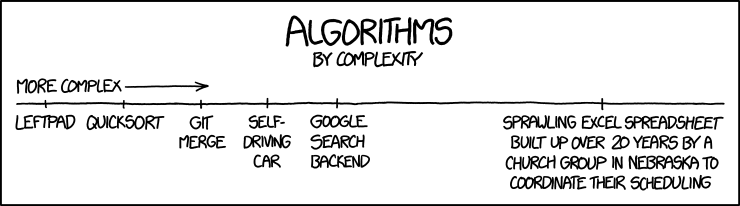
Obligatory XKCD

algorithms.png
 
There is nothing worse than a database designed by someone who has no idea how databases are supposed to work. Usually they will just shove everything into one table.

My last job but two was application support. The day I moved to that team I got access to the database behind their most critical application...it had more than one table, sure, but the most important table was actually named "Parameters" and contained all the most important pieces of information, even though they were all of distinct types with different characteristics that could have much more reasonably been separated into tables with like kinds. It was a spectacular mess. And because this was software that actually controlled the administration and monitoring of gases used in anesthesia in operating rooms it was literally a life-or-death risk when it screwed up. I was not filled with confidence about receiving treatment at that hospital until they moved to a less insane application.
 
I first used a spreadsheet in 1980, Visicalc on an Apple II, but I only used them rarely in the subsequent 40 years, so never got any good at them, even after doing a basic course. Apart from anything else, the interface for viewing the formulae in the cells seems very cumbersome to me (but I may well be missing some simple trick for viewing them), and I always felt at risk of overwriting a value or formula by mistake.

I probably didn't use a spreadsheet until about 1985, but I've been mired in them ever since. I had used at least half a dozen different software packages prior to going to Boeing in 1989, where I was first encumbered with Lotus 123. It was hilariously worse than any of the previous ones, including an MS product for C64. Especially on the 286's they insisted on using, IT not yet having spent three years testing the 386. I did some useful work with it anyhow.
Eventually they got Excel and my addiction only deepened.

Now I've been retired ten years but am still in thrall. Can't afford MS Office, but I can afford Open Office. I pretty much manage my life with Open Office Calc.* Have a multi-page spreadsheet open all day, every day, with my TTD (Things To Do) list, the "done" list for the year, Bills to Pay, Bills Paid, one to track my weight, and assorted misc junk.

When the only tool you have is Excel Open Office Calc, every problem looks like a spreadsheet.

*Yes, I've been told Libre Office is better. Many times. What I've got seems good enough.
 
Status
Not open for further replies.

Back
Top Bottom