• Quick note - the problem with Youtube videos not embedding on the forum appears to have been fixed, thanks to ZiprHead. If you do still see problems let me know.

Taskbar toolbars in XP

Rat

Not bored. Never bored.,
Joined
May 19, 2003
Messages
10,629
Location
Leicester, UK
So I have a toolbar of the desktop in my taskbar. It sits next to the systray and is obscured to the extent that the only icon that appears is My Computer (see attached). Or, at least, that's what I want. I don't have My Documents on my desktop, but nonetheless, that's exactly what appears as the single icon each time I start up, even though the toolbar is otherwise composed only of my desktop items. I delete it, and get what I want. On restart, back comes My Documents. Is there a reason for this, and can I prevent it? It's only a minor niggle, because I only restart once in a blue moon, but I find it annoying that I can't work it out.

Suggestions to install Linux or get a Mac in order to answer this question will be disregarded, but thanks anyway.

Cheers,
Rat.
 

Attachments

  • Clipboard02.png
    Clipboard02.png
    8.5 KB · Views: 69
It would appear there are two things going on. One, you are running far too many applications at once if that system bar is any indication :D. I always suggest that someone truly evaluate what they need running in the background at all times. A good start is to cut back so only your antivirus is running and run your computer until you need a program, and determine from there how often you actually use it or need it running. Also, I strongly suggest any program there that is merely a "quick start" application to make some program load quicker be ditched without remorse. I've never gained any real benefit from such applications that wasn't outweighed by the memory footprint the app takes up the rest of the time.

But back to the issue at hand, it seems your taskbar is "grouping similar items". Right click on an empty spot on the task bar (if you can find one) and select properties. Make sure the check box labelled "Group similar taskbar buttons" is unchecked, and then press Okay.

Do that and if there's still a problem we can go from there.
 
So I have a toolbar of the desktop in my taskbar. It sits next to the systray and is obscured to the extent that the only icon that appears is My Computer (see attached). Or, at least, that's what I want. I don't have My Documents on my desktop, but nonetheless, that's exactly what appears as the single icon each time I start up, even though the toolbar is otherwise composed only of my desktop items. I delete it, and get what I want. On restart, back comes My Documents. Is there a reason for this, and can I prevent it? It's only a minor niggle, because I only restart once in a blue moon, but I find it annoying that I can't work it out.

Suggestions to install Linux or get a Mac in order to answer this question will be disregarded, but thanks anyway.

Cheers,
Rat.
OK:

- I created a toolbar pointing to the desktop by right-clicking the taskbar and selecting Toolbars -> New Toolbar and then navigating to the root of the tree ("Desktop") in the New Toolbar dialog and got more or less the same results you're getting.

- Then, I did the same again, but instead navigated to C:\ -> Documents and Settings -> Iconoclast -> Desktop, and using this path I'm NOT getting any of the weirdness, even after a restart.

There's probably a good technical reason for things behaving the way they do when you navigate to the desktop folder as I did in the first example, but I have no idea what it is, except to say that the Desktop is one of the Windows "special" directories and has modified functionality compared to an "ordinary" Windows directory.

Why are you using a toolbar pointing at the desktop, that will take two mouse clicks to launch an object: one click to open the toolbar, one double-click to launch the object/application that resides there. You can still get it done in two clicks without using a toolbar if you have the "Quick Launch" bar enabled with the "Show Desktop" icon. Maybe it's just a different way of working.

Also, there's not actually such a thing as the "System Tray", it's real name is the "Taskbar Notification Area". The reasons behind that part of the taskbar getting to be known as "The Tray" are fairly interesting and are documented by Raymond Chen in his Old New Thing, and yes, there's a bunch of official Microsoft documentation that uses the incorrect term. Of course, if you were to use the term "Taskbar Notification Area" in a discussion, nobody would know what the hell you're talking about...
 
Nope, none of these things worked. Shame, but no big deal. Just curious. I even tried creating a toolbar for All Users' desktop, and the obvious problem occurred.

I know I appear to be running too many things, but they really are all things that I use all the time. To enumerate: Apache (the web server), ZoneAlarm (because it's marginally better than XP's firewall), Google Desktop (which I do find useful often enough to justify its extisting), VNC (which I use all the time), antivirus, and protein-folding thingy. Of the remaining ones, Steam and atomtime aren't usually running, and the others are just things like the network connection and graphics driver icon. All in all, doesn't have much of an impact on my 1.5GiB memory. Currently I'm using 600 MiB of physical memory, and 300 of that is Firefox, Explorer, Winamp, and Azureus.

I didn't know the systray wasn't actually called that, but then I did know the gif is supposed to be pronounced "jif", and that hasn't stopped me or anyone else using a hard G.

Incidentally, yes, it's just the way of working that I'm used to. I often have a lot of Windows open, and showing the desktop minimizes them all. I am of such little brain that this will cause me to forget what I was doing, and which window I was in.

Cheers,
Rat.
 
Rat,

Is it just "My Computer" that you want, or your desktop icons?

If you just want "My Computer", you can simply click-and-drag it into your quick launch bar, and it'll create a static shortcut for it.

Now, if the problem is just that "My Documents" keeps coming back, then try making a new folder somewhere (root of C or wherever. Not in your desktop folder). Cntrl-A on your desktop to select everything, then right-click and drag it into the new folder. Choose "Create Shortcuts here" from the menu. Then, create your toolbar based on this new folder. That should prevent the "special" nature of the desktop folder from interfereing with the setup.
 
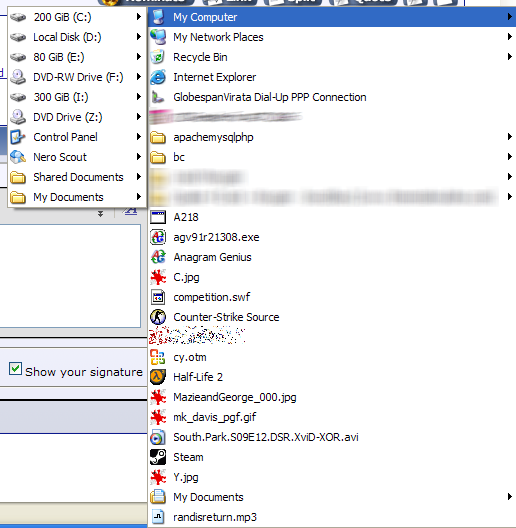
But what I want is a toolbar of the desktop contents, including My Computer. That's the only visible one because that's the only one that I open on its own, but I want it to be fully expandable like this:
Zwischenablage01.png

so that I can easily list the contents of My Computer, Network Places, and the folders, both visible and conveniently obscured, so that I can navigate to them.

I'm really just being pig-headed, as I know there are probably other ways to achieve this, but I just want to know why I can't get rid of the fugging My Documents folder. I hate it, I hate it, I hate it.

Cheers,
Rat.
 
Now, if the problem is just that "My Documents" keeps coming back, then try making a new folder somewhere (root of C or wherever. Not in your desktop folder). Cntrl-A on your desktop to select everything, then right-click and drag it into the new folder. Choose "Create Shortcuts here" from the menu. Then, create your toolbar based on this new folder. That should prevent the "special" nature of the desktop folder from interfereing with the setup.
I initially thought of that, but you end up with only a static snapshot of the desktop's contents, so if Rat drops a new file on the desktop it WON'T be available via his toolbar.
 
Rat,
Maybe I missed something, but I've set my computer up similarly. I lock my taskbar so things don't move, but as you can see from my screen shot it's quite similar. I just click on the ">>" bit next to the word "Desktop" and it gives me a menu just like you seem to be asking for.
 

Attachments

  • taskbar-shot.png
    taskbar-shot.png
    2.5 KB · Views: 20
Rat,
Maybe I missed something, but I've set my computer up similarly. I lock my taskbar so things don't move, but as you can see from my screen shot it's quite similar. I just click on the ">>" bit next to the word "Desktop" and it gives me a menu just like you seem to be asking for.
Yep, you missed something. He has no problems creating and showing the toolbar, it's the fact that the toolbar includes the My Documents folder even though it's not actually on the destop.
 
I initially thought of that, but you end up with only a static snapshot of the desktop's contents, so if Rat drops a new file on the desktop it WON'T be available via his toolbar.

Yes, but it would give access to all the programs and such. It's not perfect, but it's a quick work-around for the time being :)

And depending on why he wants it there, that may be all he needs (if it's primarily for access to program shortcuts, for example).

You might try going to Microsoft's support site and getting onto the forums. You can find a lot of info there from other users and tech experts. Might be something worth looking at.
 
But what I want is a toolbar of the desktop contents, including My Computer. That's the only visible one because that's the only one that I open on its own, but I want it to be fully expandable like this:

Image snipped...

so that I can easily list the contents of My Computer, Network Places, and the folders, both visible and conveniently obscured, so that I can navigate to them.
I still think that you will get exactly this simply by moving the "Desktop" toolbar so that no buttons are visible, then just clicking on the ">>". "My Documents" is always at the top of the menu, but I don't think that can be helped. See attached image.
 

Attachments

  • taskbar-screenshot-2.png
    taskbar-screenshot-2.png
    12.1 KB · Views: 10
I think this answers your question(?):

What you need is a toolbar that's tied to the folder that holds your Desktop icons rather than to the grand all-encompassing virtual folder named Desktop. Right-click the taskbar, choose Toolbars, then New Toolbar. Navigate to My Computer\C:\Documents and Settings \username\Desktop (replace username with your actual username), then click OK. This toolbar's only contents are the file and folder shortcuts (or actual files and folders) that reside in your desktop folder.
Keeping a Clean Desktop
 
Thanks all for answers, anyways. I should have made more clear that I didn't really want to know how to do it (even though that's what I said), but more why I couldn't do it, and to make sure I wasn't missing something obvious; and if the combined minds here don't know the answer, I suspect there isn't one.

Never had this trouble in W2K, though.

Cheers,
Rat.
 

Back
Top Bottom